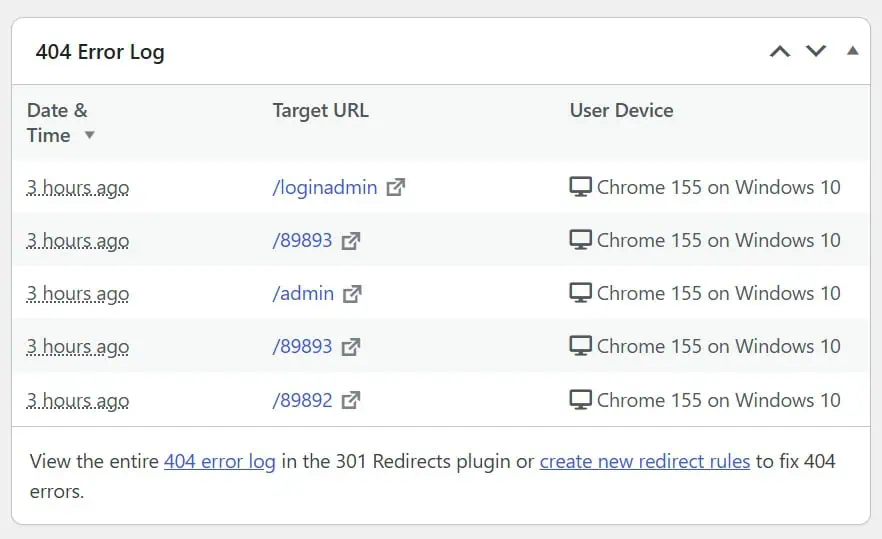

301 Redirects Pro is a handy plugin to manage redirects and keep an eye on those pesky 404 errors. But as with many plugins, it comes with a little gift you didn’t ask for: a widget that shows up in your WordPress Dashboard every single time you log in.
If you never check it (or you prefer to review your 404 errors from the plugin’s own page), that widget is just another unnecessary element that loads, takes up space and consumes server resources in your backend. And if you’ve read my guide on how to remove dashboard metaboxes, you already know how I feel about those. 😉
The good news is that getting rid of it is quick: you only need one line of code in your functions.php file, no extra plugin required.
The functions.php file is a file inside your WordPress theme that lets you add custom PHP code to extend or modify your site’s behavior. If you’re not familiar with it, I recommend checking out the guide on how to access and safely edit the functions.php file.
Option 1: You don’t have the metabox snippet yet
Open your theme’s functions.php, and paste the following snippet at the end of the file:
function acc_hide_metaboxes() {
    $screen = get_current_screen();
    if ( ! $screen ) {
        return;
    }
    remove_meta_box( 'wp301_404_errors', 'dashboard', 'side' ); // 301 Redirects Pro
}
add_action( 'wp_dashboard_setup', 'acc_hide_metaboxes', 20 );
Save the file, reload your Dashboard, and the widget will be gone. That’s it!
Option 2: You already have the snippet
If you followed my guide on how to remove dashboard metaboxes and already have the acc_hide_metaboxes function in your functions.php, you don’t need to add the whole thing again. Just add this line inside the function, below the other lines:
remove_meta_box( 'wp301_404_errors', 'dashboard', 'side' ); // 301 Redirects ProFor example, if you were already removing a couple of other widgets, your code would look like this:
function acc_hide_metaboxes() {
    $screen = get_current_screen();
    if ( ! $screen ) {
        return;
    }
    remove_meta_box( 'dashboard_quick_press', 'dashboard', 'side' ); // Quick Draft
    remove_meta_box( 'dashboard_primary', 'dashboard', 'side'); // WordPress Events and News
    remove_meta_box( 'wp301_404_errors', 'dashboard', 'side' ); // 301 Redirects Pro
}
add_action( 'wp_dashboard_setup', 'acc_hide_metaboxes', 20 );
What happens to the plugin after removing the widget?
Nothing bad, I promise! The remove_meta_box() function only removes the widget from the Dashboard screen. It doesn’t touch the plugin itself, so:
- Your redirects keep working exactly as before.
- The plugin keeps logging 404 errors.
- You can still review everything from the plugin’s own page in your WordPress admin.
In other words, you get a cleaner and lighter Dashboard, and you lose nothing but one box you probably weren’t looking at anyway.
Why not just use “Screen Options”?
Good question! At the top right of the Dashboard, you’ll find the Screen Options tab, where you can untick the widgets you don’t want to see. It’s quick, but it has two drawbacks:
- It only applies to your user. Every other user on the site will still see the widget unless they hide it too.
- It hides the widget visually, but the widget is still registered and loaded in the background.
Removing it with code gets rid of the widget for all users and prevents it from being loaded in the first place, which is exactly what we’re after when optimizing the backend.
Want to clean up more widgets? Check out the full guide on how to remove dashboard metaboxes for a faster backend in WordPress, where you’ll find the code for the default WordPress widgets and for many other popular plugins.