I previously talked about what Preconnect is and why you should implement it on your website. In this occasion I will talk about DNS Prefetch, a similar technique.
What is DNS Prefetch?
You probably know that domains exist just so we don’t have to remember the IPs of the servers of every website. Resolving a domain to an IP address is a process that takes some time, usually around 20–120ms, and that is done for every external domain that your website includes. Wouldn’t it be nice if these lookups were made in the background while your page is loading, so when the actual resources need to be downloaded it all would take less time? That’s what DNS Prefetch does.
DNS Prefetch tells the browser to look up the domain name and resolve it to an IP address as soon as possible in the background while the rest of the page is loading. To illustrate this, let’s do a simple test.
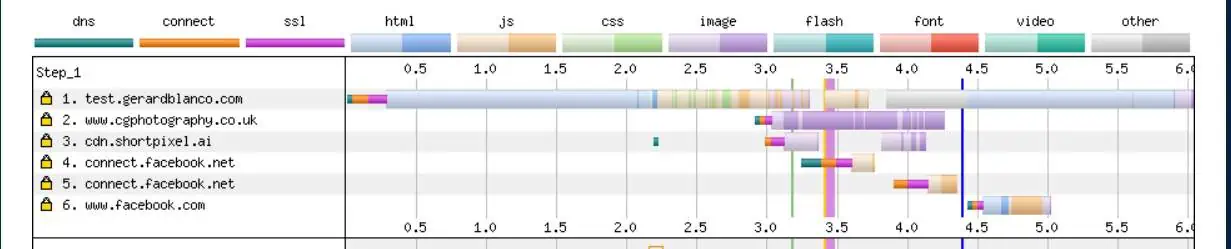
The previous screenshot shows a test site with a few external connections without doing DNS Prefetch. And here’s with DNS Prefetch:
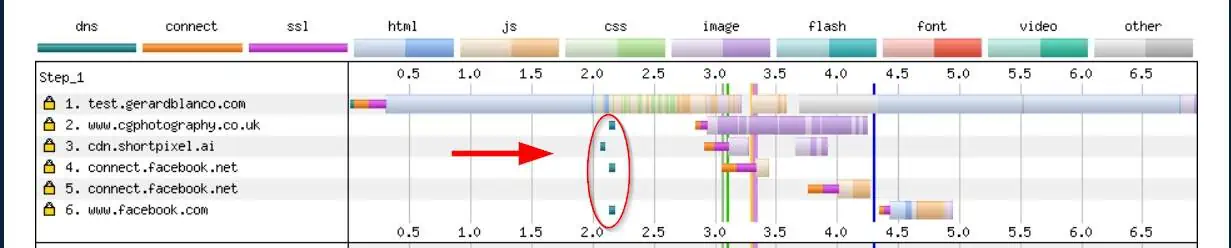
Do you see those little turquoise bars before each connection? That’s the time it takes to look up the domain name. If dns-prefetch is not in place, each third-party request waits for DNS resolution, which delays the start of the connection. With dns-prefetch, that step is performed sooner, so requests can proceed faster when the resource is actually needed.
How to implement DNS Prefetch?
Following the previous example, the goal is to enter the following lines between the tags <head> and </head> of the site.
<link rel="dns-prefetch" href="//www.chphotography.co.uk">
<link rel="dns-prefetch" href="//connect.facebook.net">
<link rel="dns-prefetch" href="//www.facebook.com">
Note: I did not add the connection to cdn.shortpixel.ai, because ShortPixel Adaptive Images, which is installed on the test site, already adds a preconnect rule, so there’s no need for a dns-prefetch.
To add those lines, we have two methods.
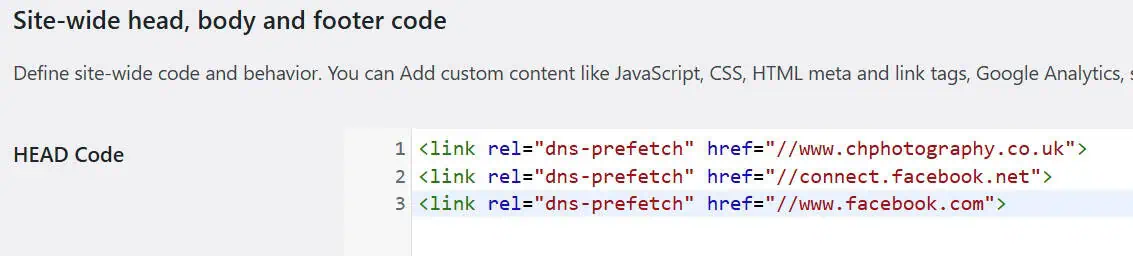
1 – Use a plugin like Head & Footer Code. Install, activate it, go to Tools > Head & Footer Code and add the code in the first box.
2 – The recommended method, but for advanced users: Edit the functions.php file of your child theme and add the following piece of code to register your DNS prefetch domains via WordPress’ native API. Notice that you only need to enter the URLs, not the full <link rel="dns-prefetch... line.
add_filter('wp_resource_hints', function($urls, $relation_type){
  if ($relation_type === 'dns-prefetch') {
    $urls[] = 'https://connect.facebook.net';
    $urls[] = 'https://www.facebook.com';
    $urls[] = 'https://www.chphotography.co.uk';
  }
  return $urls;
}, 10, 2);
Best practices: when to use dns-prefetch vs preconnect
Use rel=dns-prefetch for external domains that are likely to be requested soon but are not critical enough to justify opening a full connection in advance. Common examples include analytics beacons, ad scripts, embedded widgets, social scripts, third-party fonts, or CDNs that load later in the page.
Use preconnect for origins that are both third-party and critical to rendering or early interaction, such as your primary CDN for render-blocking CSS, your fonts domain when web fonts are supposed to be used as your main fonts, or APIs that the page needs immediately.
Here’s a table comparing both so you can pick the right one:
| Resource hint | What it does | Best use case | Cost / risk | Example syntax |
|---|---|---|---|---|
| dns-prefetch | Resolves DNS only | Likely third-party requests that aren’t critical | Low; extra DNS queries if overused | <link rel="dns-prefetch" href="//example.com"> |
| preconnect | DNS + TCP + TLS | Critical third-party origins needed early | Medium; opens sockets that may go unused | <link rel="preconnect" href="https://example.com"> |
FAQ
What is the difference between dns-prefetch and preconnect?
Dns-prefetch resolves the domain’s IP address ahead of time. Preconnect resolves DNS and also establishes the TCP and TLS connection so subsequent requests start transmitting immediately.
Does dns-prefetch improve Core Web Vitals?
It can reduce wait times for third-party requests, which may indirectly improve metrics such as LCP or INP when those requests affect rendering or interactivity. The impact varies by site, but any actual improvement to Core Web Vitals will be very small, if noticeable at all.
How many domains should I prefetch?
You can safely add all third-party domains that your website connects to to the list. Unlike preconnect, overusing dns-prefetch should not have a noticeable impact on performance.
How do I test dns-prefetch?
Run a before/after test with your browser’s Network panel or a waterfall tool (I recommend WebPageTest, which is where the previous screenshots came from).